
On this page
On this page
Jump to a section
To watch IPTV on a Mac with an M1 chip or newer, install IPTVX from the Mac App Store and sign in with the Xtream Codes login from your IPTV Canada provider; on an older Intel Mac, use Kodi with its IPTV Simple Client, or VLC. Either way it takes about 15 minutes. The login comes in the welcome email for your IPTV Subscription, and if you already use IPTVX on an iPhone or Apple TV, iCloud brings your playlist to the Mac with nothing to type.

1. Check Your Mac First
Open the Apple menu > About This Mac. The line that matters is the chip:
- Apple M1 or later: you can install iPhone and iPad IPTV apps such as IPTVX from the Mac App Store. IPTVX needs macOS 12 or later; Smarters Player Lite needs macOS 12.5 or later.
- Intel: those apps are not available, so use Kodi or VLC (sections 4 and 5).
Also have your welcome email open in Mail so you can copy each field, and plug a MacBook into Ethernet with a USB-C adapter if you watch live sports.
2. Which Player to Use
| Player | Where to get it | Login | Guide | Runs on |
|---|---|---|---|---|
| IPTVX | Mac App Store | Xtream, M3U | Yes | Apple M1 or later |
| Smarters Player Lite | Mac App Store | Xtream Codes, M3U | Yes | Apple M1 or later |
| Kodi with PVR IPTV Simple Client | kodi.tv | M3U link | Yes | Intel and Apple silicon |
| VLC media player | videolan.org | M3U link | No | Intel and Apple silicon |
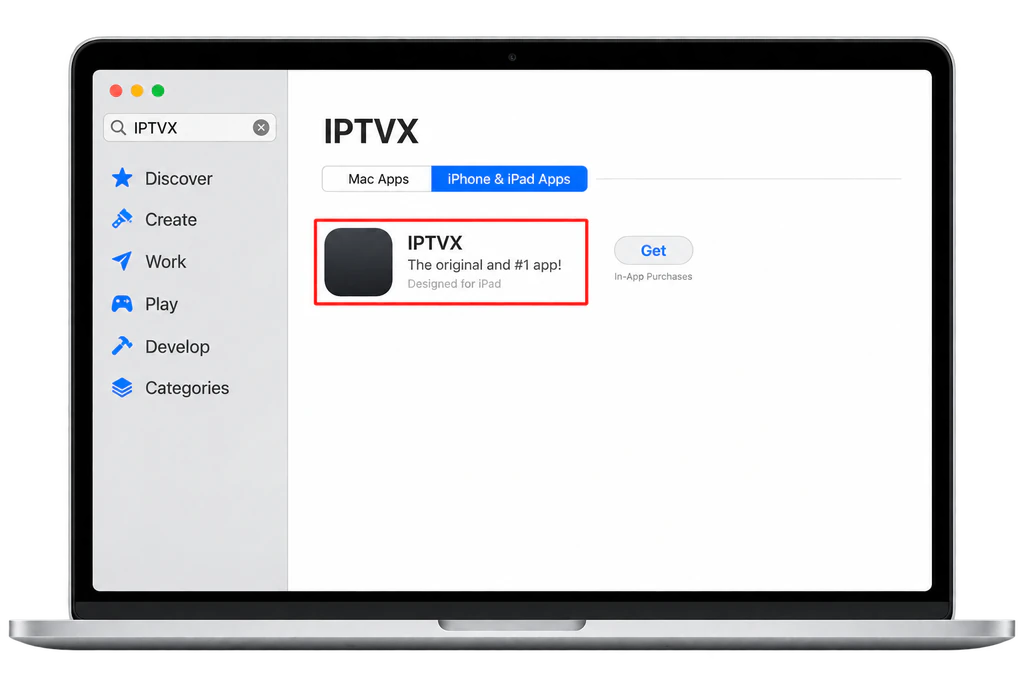
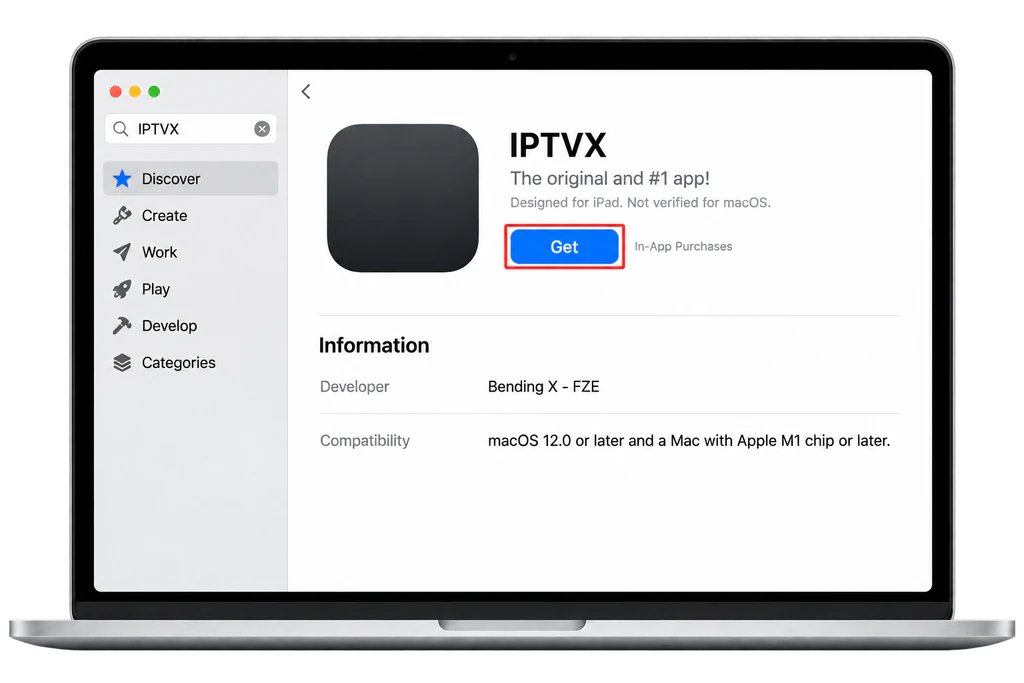
IPTVX and Smarters Player Lite are iPad apps that Apple lets run on newer Macs, so the App Store marks them “Designed for iPad” and “Not verified for macOS”. They work, but expect touch-style menus. Our best free IPTV apps post compares players for every device.
3. Install IPTVX and Sign In (M1 or Newer)
- Open the App Store on the Mac, search for IPTVX and, if needed, select iPhone & iPad Apps in the results.
- Check the developer is Bending X FZE, then click Get.
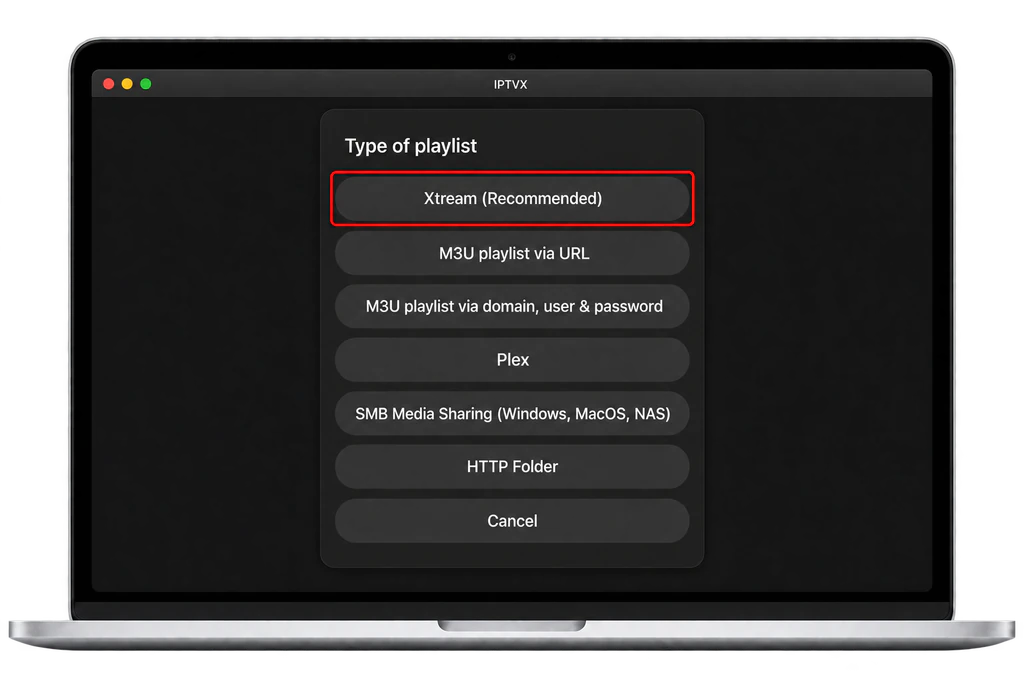
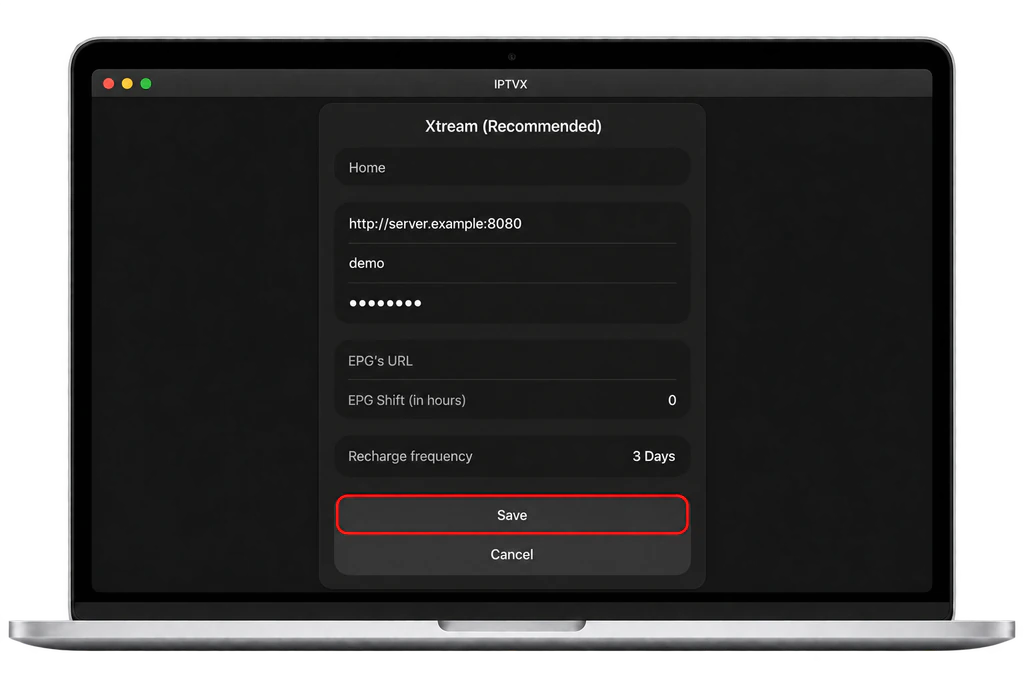
- Open IPTVX and choose New playlist, then Xtream (Recommended).
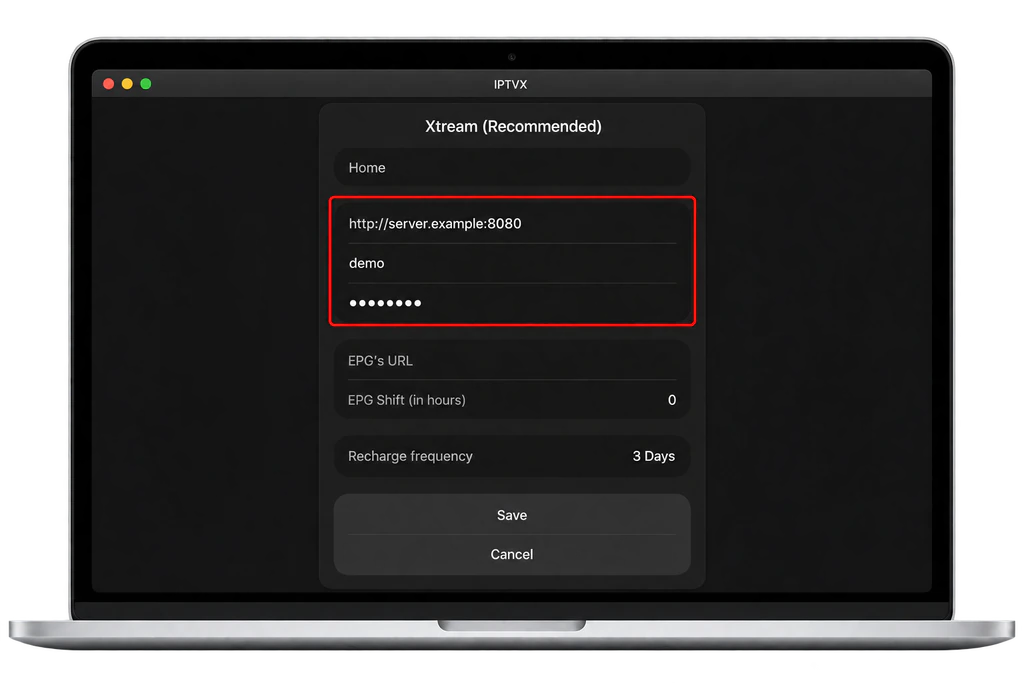
- Type a playlist name, paste your server address into Domain (with
http://orhttps://and the port), and paste your username and password.
- Click Save and wait while the channels, films and series load.
If you already set up IPTVX on an iPhone or Apple TV with the same Apple ID, open it on the Mac and wait a minute: iCloud brings the playlist across. The full walkthrough, with screenshots of each IPTVX screen, is in our Apple TV, iPhone and iPad guide.
4. Use Kodi for a Full Guide on Any Mac
Kodi plays your M3U link with a proper TV guide on Intel and Apple silicon Macs. If your email only has Xtream Codes details, build the M3U link first, as our post on where to get an IPTV URL shows.
- Download Kodi from the official Kodi macOS page, open the file and drag Kodi into Applications.
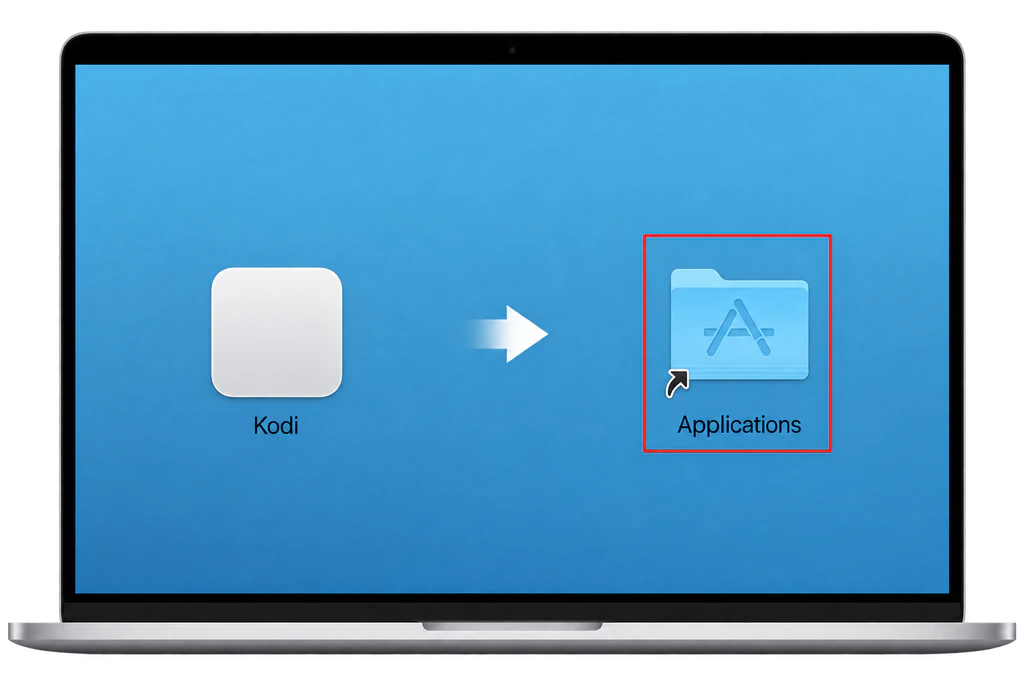
- Open Kodi. If macOS asks for confirmation the first time, check the app came from kodi.tv before you allow it; Apple explains these checks on its safely open apps page.
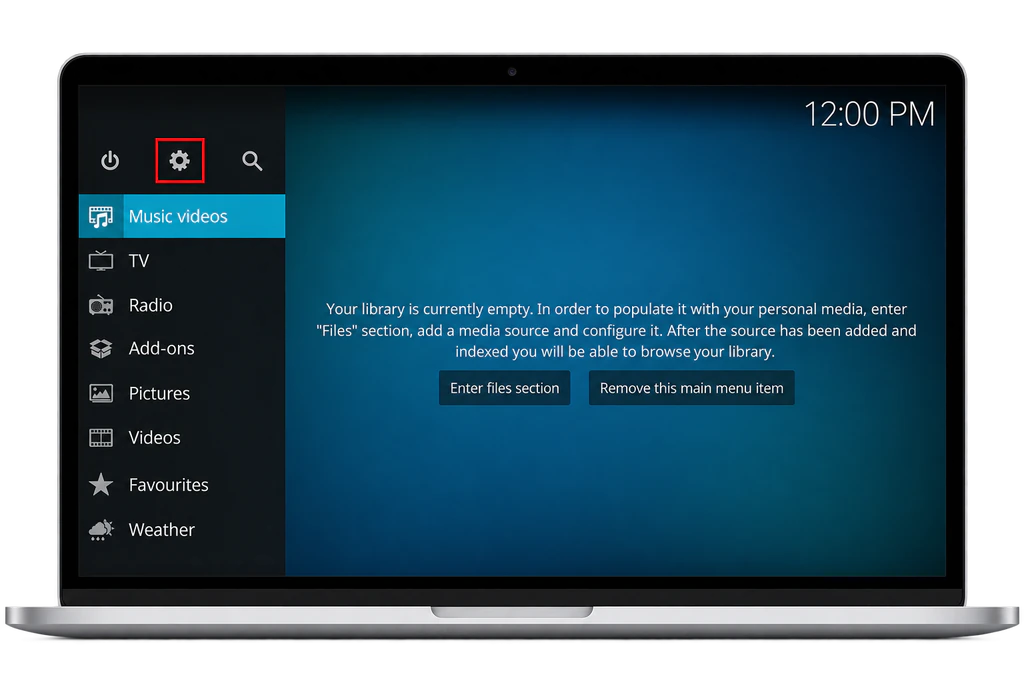
- Select the gear icon for Settings, then Add-ons > My add-ons > PVR clients > PVR IPTV Simple Client. If it is not listed, use Install from repository > PVR clients and install it.
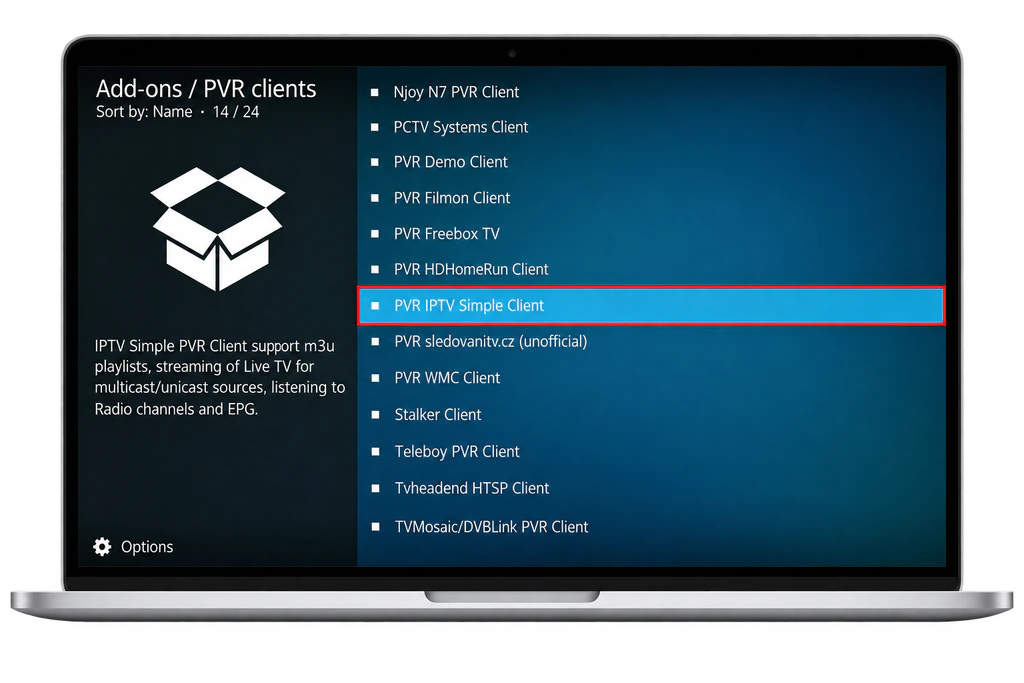
- Select Configure. Under General, set Location to Remote path and paste your link into M3U play list URL.
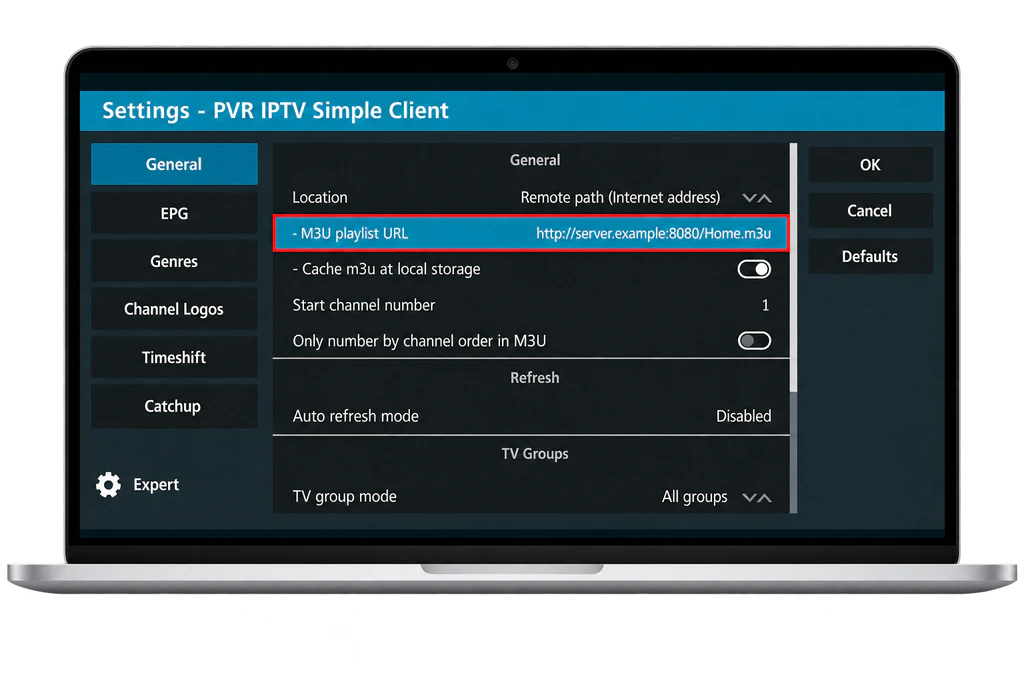
- In the EPG settings, set Location to Remote path and paste your guide link into XMLTV URL.
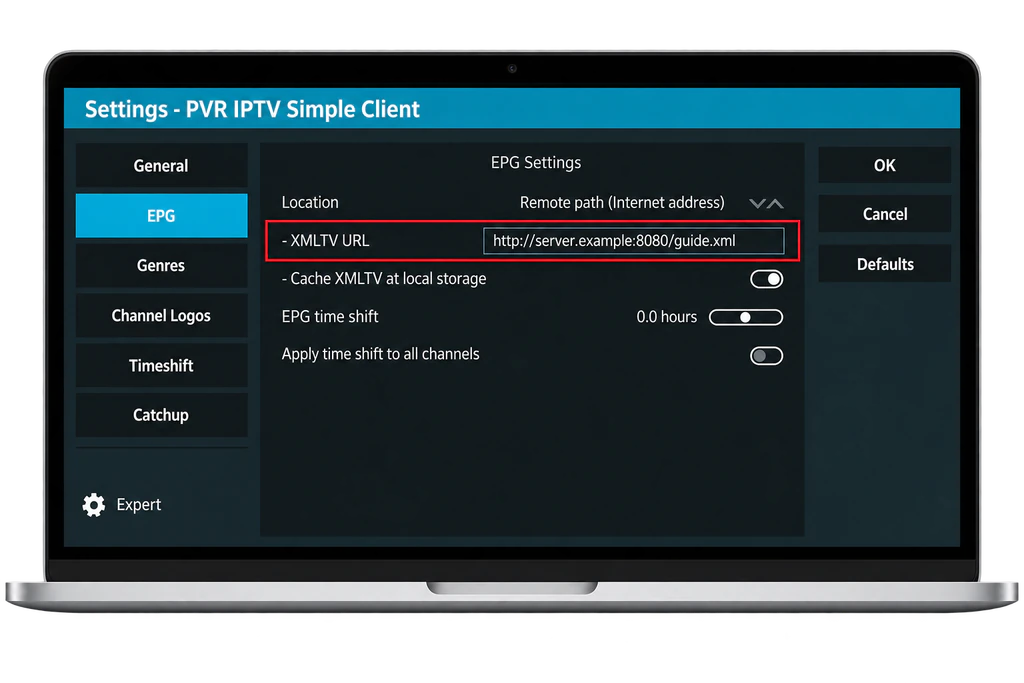
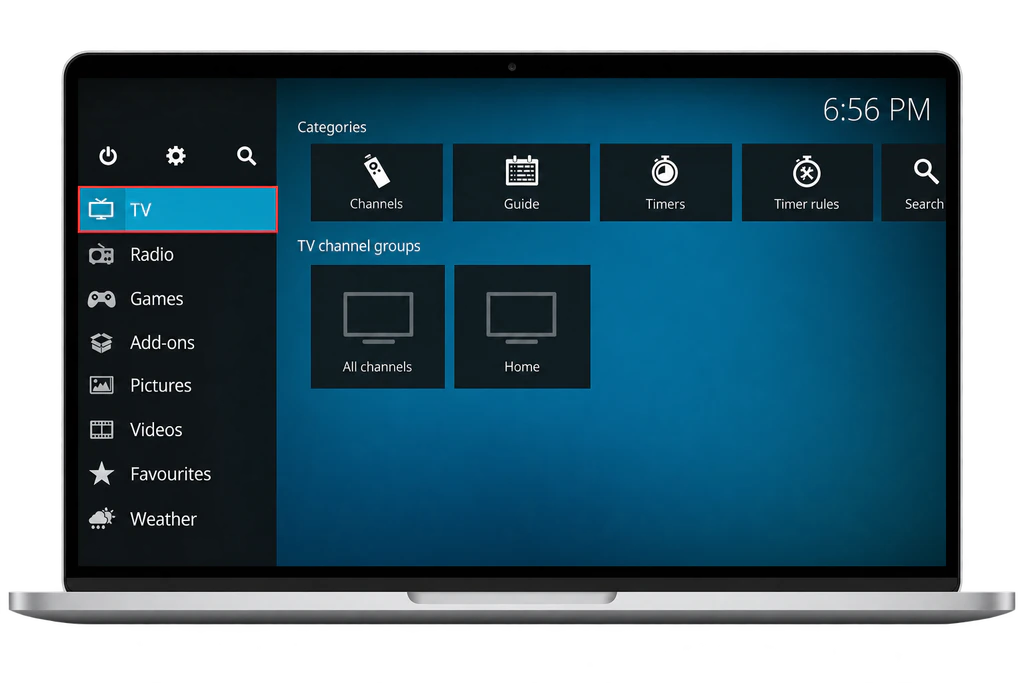
- Select OK, then Enable, restart Kodi and open TV from the main menu.
Never turn off Gatekeeper to install a player, and only add Kodi add-ons from its official repository.
5. Test Your Link in VLC
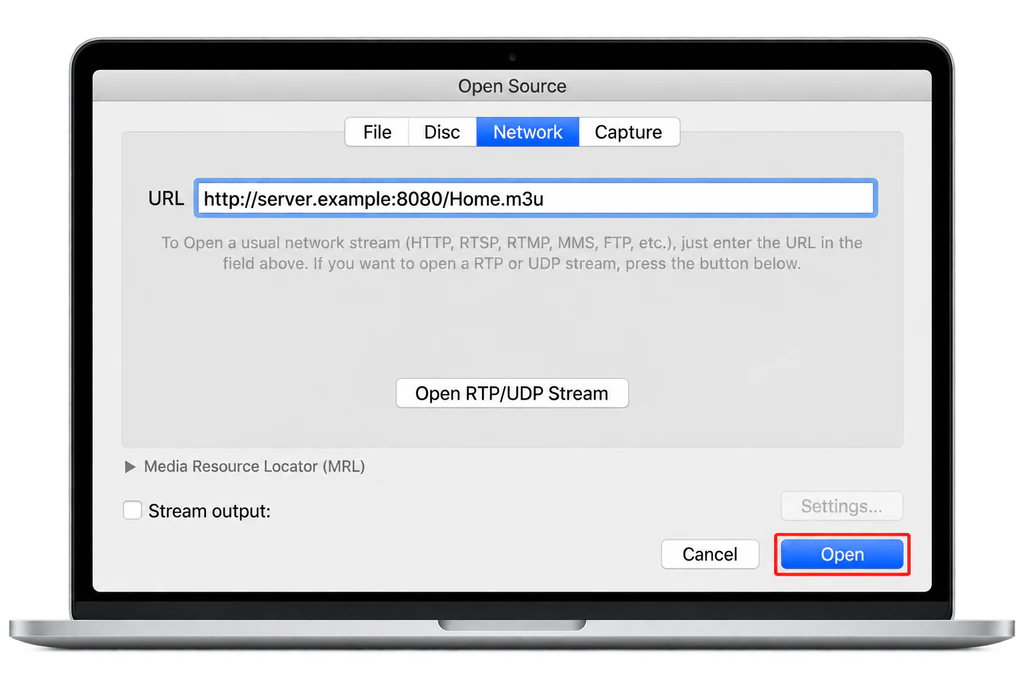
- Open VLC and press Command + N, or choose File > Open Network.
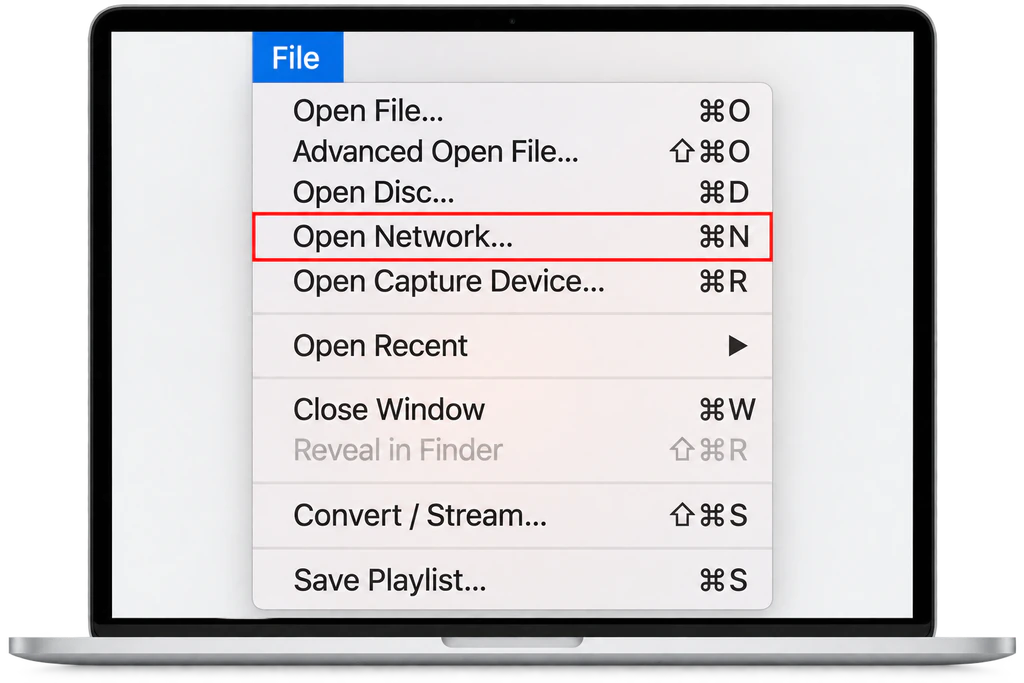
- Paste your M3U link and click Open.
- Open Window > Playlist to switch channels.
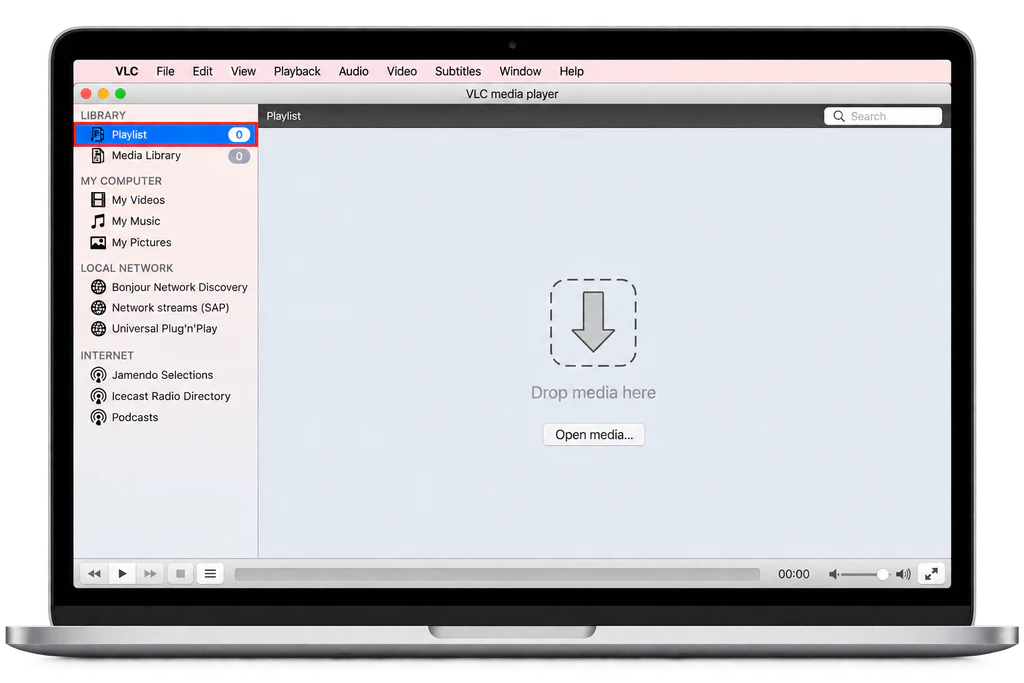
VLC has no guide, but it is the quickest test there is: a channel that plays in VLC and not in your main player points at the player, and one that fails in both points at the link or the account.
6. Watch on Your TV From the Mac
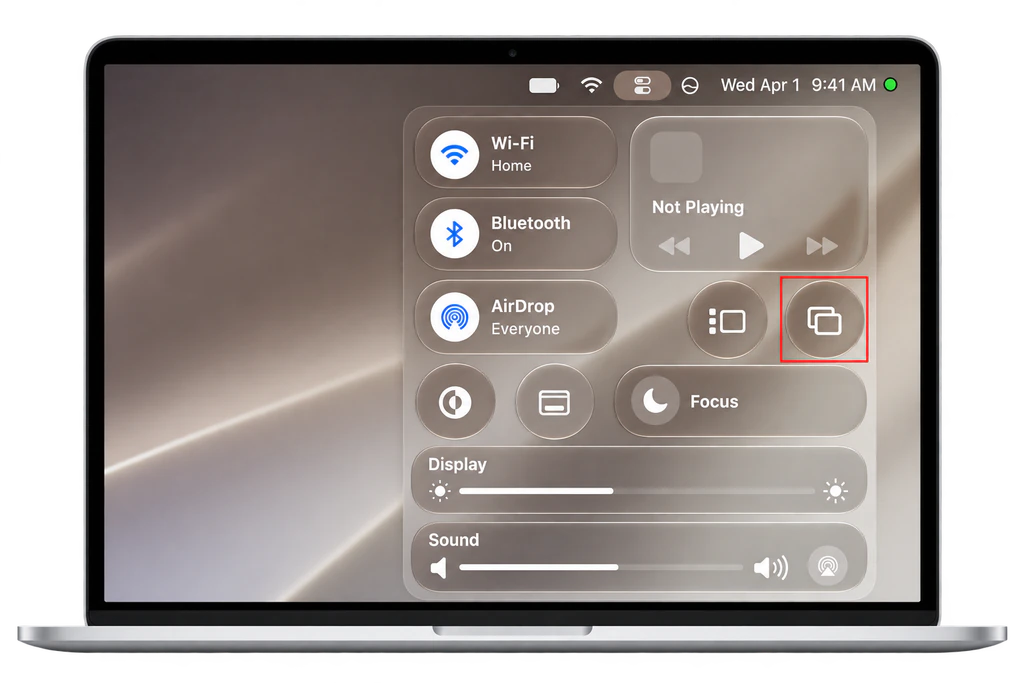
- AirPlay: with the Mac and an Apple TV or AirPlay compatible smart TV on the same network, open Control Centre, click Screen Mirroring and choose the TV, as Apple’s AirPlay guide for Mac explains. Choose to use the TV as a separate display to keep the guide on the Mac and the channel on the TV.
- HDMI: a Mac mini and recent MacBook Pro models have an HDMI port; other Macs use a USB-C to HDMI adapter. A cable is steadier than AirPlay for sports.
- A device on the TV: for nightly viewing, an Apple TV is simpler than a laptop on the coffee table.
7. Guide, Favourites and Performance
- Wrong programme times: check System Settings > General > Date & Time first, then the guide offset in the player.
- Favourites: use the player’s star or right click menu, and hide the categories you never open.
- Parental controls: set a PIN in the player, or give a child their own macOS account with Screen Time and no IPTV app.
- On a MacBook: keep it plugged in, since Low Power Mode slows video, and play full screen with heavy browser tabs closed.
- Several screens: the Mac and a TV streaming at the same time use two connections on your plan.
8. Fix Common Mac Problems
Buffering or freezes
Plug in Ethernet or move to 5 GHz Wi-Fi, restart the router, then quit the player with Command + Q and reopen it. If it continues, our checklist for IPTV that stops working tells you within five minutes whether the problem is the Mac, your network or the service.
IPTVX does not appear in the Mac App Store
Your Mac has an Intel chip, or macOS is older than version 12. Update macOS if you can, or use Kodi.
Kodi shows no channels or no guide
Open the add-on’s Configure menu and check both Location settings are Remote path and the links are complete. Give the guide a few minutes after the first restart.
Sound out of sync
Use the player’s audio delay setting. In VLC, Window > Track Synchronization shifts the audio in small steps.
Login rejected
Paste the details again from your email and check for a space at the end of the password. If the link also fails in VLC, IPTV Support can confirm your account from their side.
Frequently Asked Questions
Does IPTV Smarters Pro have a Mac version?
Its developer’s website, where the desktop version was downloaded, has been offline. On an M1 or newer Mac, Smarters Player Lite from the Mac App Store is the official alternative.
Can I use the same IPTVX purchase on my Mac and iPhone?
Usually, since purchases are tied to your Apple ID. Check in the app before buying an upgrade a second time.
Will IPTV drain my MacBook battery?
Streaming video uses more battery than browsing. For a long game, plug the MacBook in.
Can I use the Mac as the TV guide while the TV plays the channel?
Yes. Use AirPlay or HDMI with the TV as a separate display, keep the player’s guide on the Mac screen and move the video window to the TV.
Is it safe to install Kodi on a Mac?
Yes, from kodi.tv. Kodi is free, open source software. The risk is unofficial add-ons that promise free channels; stick to the official repository.
Is it legal to watch IPTV on a Mac?
The Mac and these players are legal. Whether the channels are licensed depends on the provider behind your login, as our post on whether IPTV is legal explains.
Do I need a VPN for IPTV on a Mac?
No. A VPN is optional, and our post on whether you need a VPN for IPTV explains when it helps, such as on public Wi-Fi with a MacBook.
Conclusion
On an M1 or newer Mac, IPTVX from the App Store is the quickest route, and Kodi gives any Mac, Intel included, a full TV guide from your M3U link. Check the chip in About This Mac before you install anything, because that one line decides which section of this guide is yours. If you are still choosing a service, an IPTV free trial lets you test it on your Mac first.